
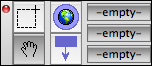
The Tinderbox toolbar is shown, by default, whenever the application is open. If not required the auto-open can be turned off in the Preferences' General pane. If the toolbar is hidden it can be called from the Window menu or via the shortcut Cmd+Shift+T. With the exception of the parking spaces, there are plenty of ways you can access the toolbar's features without needing the toolbar so experienced users may soon find they don't need it visible. When Tinderbox loses OS focus the toolbar is hidden — unlike Note/View windows — and is restored when Tinderbox takes focus again.
From v5.10.2, the Toolbar no longer shows roll-over tooltips for its buttons.