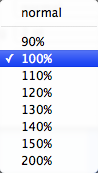
Line Spacing pop-up menu

Tinderbox Icon

This controls the spacing between lines in the $Text pane of a note text window ($LineSpacing). The spacing is set in percent terms. The default is 100(5), smaller values give tighter spacing, larger values give wider spacing, such as allowing the printing of line-spaced text for paper-based proof-reading. The presets are:

  • 90
  • 100 (default)
  • 110
  • 120
  • 130
  • 140
  • 150
  • 200 (equates to line-spaced text)
Line Spacing pop-up menu

Possible relevant notes (via "Similar Notes" feature):

Up: Popup Menus
Previous: HTML Export View: Template pop-up menu  Next: Link Types: Types pop-up menu 

A Tinderbox Reference File : Menus : Popup Menus : Line Spacing pop-up menu aTbRef Site Map

Quicklinks: Attributes | Action Codes | Export Codes | Designators | Date Formats | aTbRef Site Map

[Last updated: 16 May 2012, using v5.11.1]


Search:

Google search aTbRef for:  


Creative Commons Licence

aTbRef by Mark Anderson is licensed under a Creative Commons Attribution-NonCommercial-ShareAlike 3.0 Unported License.

[See aTbRef CC licence Attribution & Waiver info]

Made with Tinderbox