
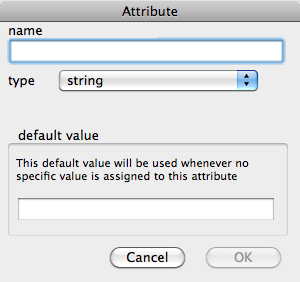
Called from the Create button of the User pane of the Attributes dialog/window.
- name. The name of the new attribute. Allowed characters: A-Z, a-z, 0-9 (and excluding commas & hyphens!). See below for more on naming.
- type. The data type of the attribute, select from a pop-up menu. The list may contain greyed out types; these types are for internal app use only and are not available to users.
- sequential tick-box. Only shown when 'number' data type is selected. When ticked, the attribute value for all new notes is a number sequentially one greater than the last created note. If added to a TBX with pre-existing notes, all these too are given a sequential value when the attribute is created.
- default value. This value is applied to all new notes.
Note that by convention, all Tinderbox attributes use initial capitals, are inter-capitalised and usually based on more than one word. Thus an attribute called 'UserName' would be more correct than 'Username'. Using 'username', whilst allowable, might cause some miscalculations if used in queries/codes. You are not compelled to follow this format but doing so is less likely to cause unforeseen errors if you go on to use macros and export codes.
Although you can both rename and amend data types - only for user attributes - after initial creation this can cause Tinderbox to not display some information correctly. You are advised to create a new attribute and delete the old one. If you create the new attribute first, you can use an agent to copy the data to the new attribute before deleting both the agent and the old attribute.